Help centre / Calculator
Use: work out a cost from price and how much you use
Flour is 80 per kg and a cake uses 200 g? The Use button does the sum, and remembers it so you can change the price later.
Last reviewed 2026-11-11
Many costs are not one price per item. You buy flour by the kg but a cake takes 200 g. The Use button next to a cost row turns what you pay and how much you use into the cost for one unit sold.
Use: short video
Short video, coming soon. The steps above show the same thing.
Example
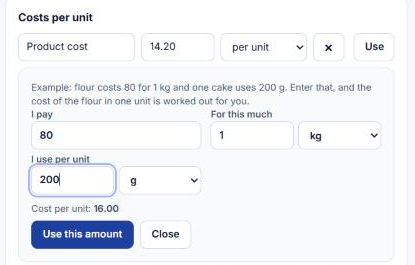
- 1Press Use on the Flour row.
- 2I pay: 80. For this much: 1 kg.
- 3I use per cake: 200 g. The helper shows the cost, 16.00.
- 4Press Use this amount. The 16.00 is filled in and the row shows how it was worked out.
When the price changes
Press Use on the same row again. Your numbers are already there. Change only the price and press Use this amount. This works after you save and reopen the calculation too.
Good to know
- Units must match in kind: weight with weight, volume with volume, length with length, pieces with pieces. The helper tells you when they do not.
- Results are rounded up to four decimals, so a price never falls short.
- If you type the amount by hand afterwards, the saved working is removed so it cannot disagree with the number you see.