Help centre / Calculator
Where do you sell: add the fees of your sales channel
Choose a shop, marketplace or your own store and the fees that take a share of each sale are added for you.
Last reviewed 2026-11-11
Every place you sell takes something: a card fee, a marketplace commission, a delivery-app cut. These are taken from the price the customer pays, not from your cost, so they change the price you need.
Where do you sell: short video
Short video, coming soon. The steps above show the same thing.
How to use it
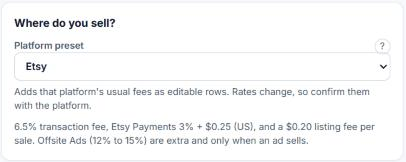
- 1In the Calculator, find the card Where do you sell? It sits just under What kind of business?
- 2Choose your channel. The fee rows appear under Fees as a percentage of the price.
- 3Check each percentage against your own statement and change it if yours is different. The suggested numbers are a starting point.
- 4Selling in more than one place? Save one calculation per place, and compare the prices.
Fees are counted against the selling price. That is why a price set by adding a mark-up to your cost often earns less than planned.