Help centre / Analysis
Reading the result: price, profit, margin and mark-up
What each number on the result card means and what to do when the profit looks too low.
Last reviewed 2026-11-11
After you fill in the costs the result card shows the numbers that matter. Read them top to bottom.
Reading the result: short video
Short video, coming soon. The steps above show the same thing.
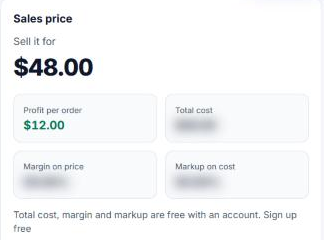
In the free demo only the price and the profit show. With a free account you also see total cost, margin on price and mark-up on cost.
- Sell it for: the price that gives the profit you asked for after all costs and fees.
- Profit per order: what you keep from one order. It is not the same as the till total.
- Total cost: everything you pay for one order, including fees taken from the price.
- Margin on price: profit as a share of the price. Best for judging how healthy a product is.
- Mark-up on cost: profit as a share of cost. Useful when suppliers or your trade talk in mark-up.
When the profit looks too low
- 1Look at the cost breakdown chart. The biggest slice is where to save first.
- 2Check fees. A high percentage fee is often the quiet reason a product earns little.
- 3Raise the profit target a little and see the price move. Compare with what customers pay for similar items.
- 4If profit per order is zero or less, no amount of selling covers your monthly costs. Change the price or the costs.
Break-even
Add monthly costs such as rent and wages. Break-even shows how many orders per month cover them. Below that number you lose money, above it you earn.